Project Write-up
Welcome to osu! in a browser
Welcome to osu!
Github Repo: https://github.com/N0zoM1z0/oszillator
Live demo: https://n0zom1z0.github.io/oszillator/
Autoplay demo video:
https://youtu.be/4uOumV5hzYE / https://www.bilibili.com/video/BV13VRSBFEaS/
https://youtu.be/hWKigY8ZETk / https://www.bilibili.com/video/BV1khRSB2E4t/
https://youtu.be/GZAVQ0c8iPY / https://www.bilibili.com/video/BV1mHRSBXEsG/
First, a quick look at autoplay on Make a Move:
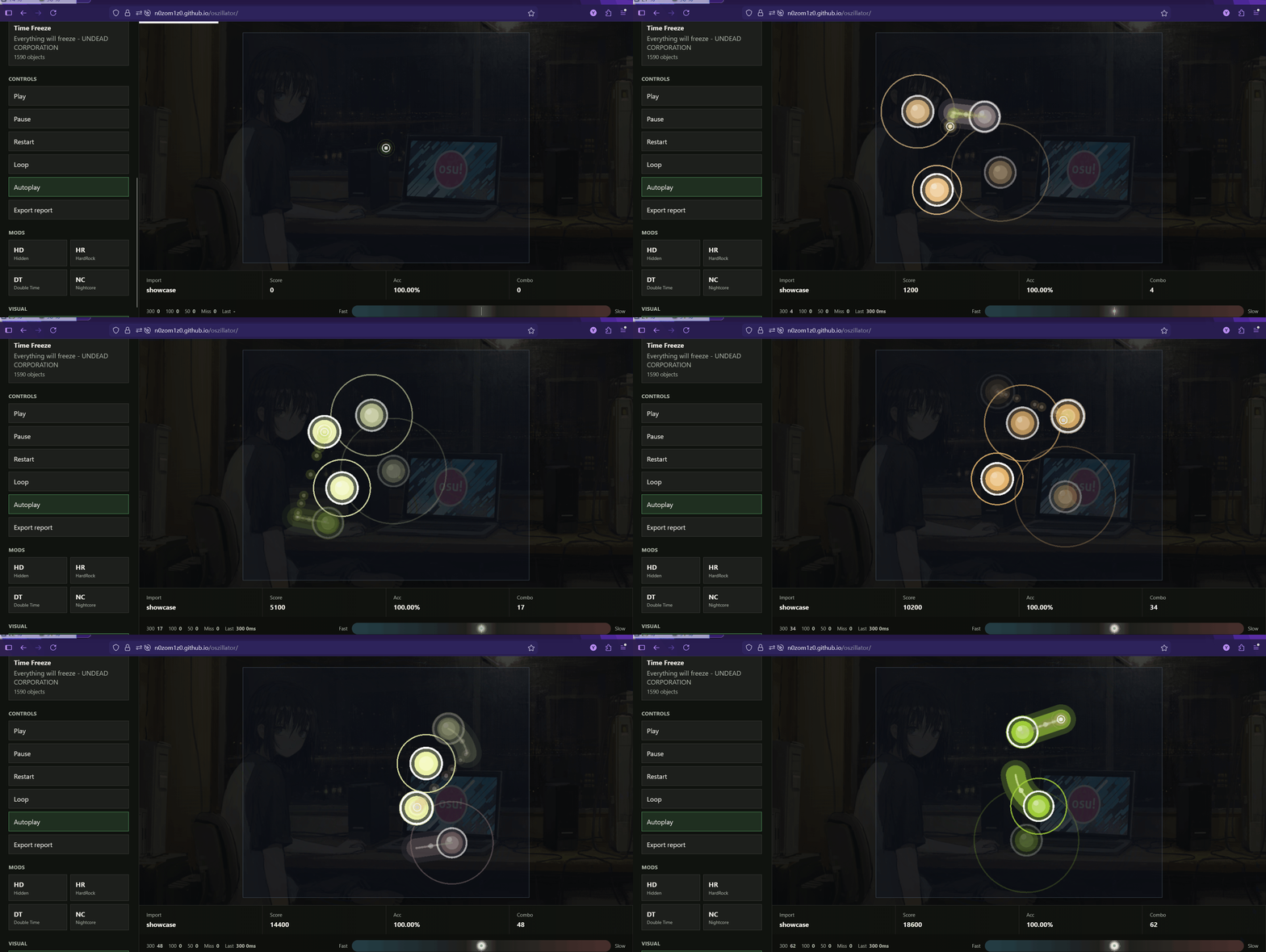
Want more? Just visit https://n0zom1z0.github.io/oszillator/ !
There is a very specific moment in osu!standard where the game stops feeling like a rhythm game and starts feeling like a little physics problem happening inside your hands.
The cursor is already moving before your brain has finished reading the next object. AR is high enough that everything feels like it appears out of nowhere. A stream starts leaning slightly left. A slider tail arrives one tick later than your muscle memory expected. Your keyboard taps are either perfectly locked in or completely cooked. Somehow this is stressful, beautiful, stupid, and fun at the same time.
That was the actual starting point for oszillator.
Not "let's build a serious lab."
Not "let's replace osu!."
Not "let's make a ranked client, a private server, a score system, or a perfect compatibility layer."
The original thought was much simpler:
What if osu!standard could run in a browser tab?
Just for fun.
Drop a .osz file into the page. Pick a difficulty. Click circles. Follow sliders. Spin spinners. Watch autoplay do cursed cross-screen jumps. See the background video play behind the field. Hit Z and X. Smoke with C. Miss because you were late. Restart. Try again.
That is the spirit of oszillator. It is an unofficial web experiment for osu!standard-style gameplay: a browser player that tries to make the act of clicking circles feel smooth, expressive, and surprisingly alive.
The "local import" part is important, but it is not the soul of the project. It is the boundary that makes the web experiment clean. No login. No score submission. No online beatmap download. No pretending to be official. The browser reads the file you provide, runs the game loop, plays the audio, renders the objects, and keeps local scores on your machine.
The soul is: I wanted to see osu!standard happen inside a web page, and I wanted it to feel good.
The First Mental Model#
The earliest version of the idea was a pipeline:
.osz archive
  -> unzip in the browser
  -> find .osu files
  -> parse timing, metadata, difficulty, objects, and media events
  -> prepare osu!standard-style runtime objects
  -> play audio with Web Audio
  -> render the playfield
  -> judge input against the audio clock
That still describes the app today.
The key decision was to keep the gameplay core separate from the web UI. The renderer should not parse .osu. The ruleset should not know about PixiJS or DOM nodes. The parser should not decide what a hit means. Audio timing should not be guessed from animation frames.
So the project grew into packages:
apps/playerowns the browser app, import UI, Web Audio orchestration, and Pixi canvas lifecycle.packages/osz-loaderunzips.oszarchives and builds a usable asset manifest.packages/osu-parserparses.osufiles with warnings instead of brittle failures.packages/ruleset-stdprepares osu!standard-style objects, mods, judgement, and scoring.packages/slider-geometryhandles slider paths deterministically.packages/renderer-pixirenders prepared gameplay state.packages/audio-engineexposes the Web Audio clock.packages/storagekeeps local metadata, settings, and scores.
That package split sounds boring, but it is why the project stayed flexible. When sliders looked wrong, we could work on geometry. When judgement felt off, we could work on the ruleset. When the cursor felt dead, we could work on renderer motion. When media loading broke, we could work on the player app without dragging gameplay code into it.
The web version is fun precisely because the core is not a pile of UI hacks.
Timing: The Browser Is Not a Metronome#
The first real problem was time.
In a rhythm game, "now" is not whatever requestAnimationFrame says. Frames jitter. Tabs get throttled. The browser is allowed to miss a frame. Your monitor refresh rate is not the beatmap clock.
The audio clock has to be the source of truth.
So oszillator treats Web Audio as the authoritative timeline. The renderer asks, "what should be visible at this audio time?" The ruleset asks, "what object is hittable at this audio time?" Input is judged against that same timeline.
This made a huge difference. Before that, the app could look okay while still feeling slightly wrong. After moving judgement and rendering around the audio clock, the game started feeling grounded. Approach circles lined up better. Autoplay looked more intentional. Hit windows became meaningful.
The funny thing about rhythm game engineering is that nobody praises timing when it works. They only notice when it is bad. Good timing just disappears.
That was the goal.
Parsing Real Beatmaps Without Exploding#
.osu files are simple until they are not.
There are old fields, missing fields, weird event lines, storyboards, videos, inherited timing points, odd slider definitions, and maps that do not care about your beautiful parser assumptions.
The parser therefore uses a warning-first approach. Unknown fields should not crash the app. Unsupported details should be reported, not treated like fatal errors. The browser player should keep going when a map contains extra information it does not need.
This is one of those choices that makes the app feel much more real. A toy parser can handle one hand-made fixture. A player needs to survive actual .osz files found in the wild.
We also made the renderer consume prepared beatmap state only. It does not parse .osu, it does not interpret raw slider strings, and it does not own gameplay logic. By the time data reaches Pixi, it is already in the shape the renderer needs.
That boundary saved a lot of debugging time later.
Sliders Were the First Big Visual Fight#
Circles are easy compared to sliders.
A circle is a position, a radius, an approach time, and a judgement window. Sliders are geometry, timing, repeats, heads, tails, follow points, ticks, path length, visual thickness, stacking behavior, and player expectation all wrapped into one object.
At first our sliders technically worked, but they looked wrong. Short sliders looked like gourds. Heads and tails were too heavy. Some paths felt clipped. Repeat sliders looked confusing because both ends behaved like full circles. The shape did not communicate "follow this path" clearly enough.
We iterated on the visual language several times.
The version that finally felt better moved closer to a simple mental model:
O====}The head is a circle because that is where you start. The body is a continuous track. The tail is a shaped ending, not another full note screaming for attention. For repeat sliders, the reverse direction still has to be readable, but normal one-way sliders should not look like back-and-forth sliders.
This is a good example of where "accurate enough" and "feels right" are different axes. The browser player is not trying to be a pixel-perfect official client. It is trying to make a web version feel readable, smooth, and fun. Slider UI has to respect osu! habits while still being allowed to make its own visual decisions.
The Cursor Needed Personality#
The first cursor was basically a dot moving around.
Technically fine. Emotionally dead.
osu!standard is half rhythm game, half cursor choreography. The cursor is the thing your eyes follow. In autoplay especially, it should feel like a little comet drawing the map's movement through space.
So we added a dynamic cursor trail: short-lived particles, fading motion, smooth interpolation, and a stronger sense of acceleration. The trail is not just decoration. It makes jumps readable. It makes streams feel like streams instead of teleporting dots. It makes autoplay worth watching.
Then came smoke.
The C key is a tiny feature, but it matters because it is so osu!-coded. Smoke is not necessary for scoring. It does not make the parser better. It does not improve Web Audio timing. But pressing C and seeing that playful trail appear makes the thing feel less like a file viewer and more like a rhythm game.
Those details matter.
Judgement, Offsets, and the Bottom Bar#
Once input worked, the next question was feedback.
osu!standard is brutal because being wrong by a little can feel the same as being wrong by a lot unless the game tells you why. Was the tap early? Late? Did the cursor miss? Was the slider held long enough?
oszillator implements 300 / 100 / 50 / miss style feedback and a hit offset history. The bottom bar shows recent timing distribution so you can see whether hits are leaning fast or slow.
This is one of the places where the app accidentally becomes useful beyond the original "this is fun" motivation. If you can import a map, play it, and immediately see that your taps are consistently late, the browser toy has become a real debugging tool for your hands.
But the hierarchy still matters. The project did not start from "let's make the ultimate analytics lab." It started from "let's make osu! happen in a browser." The timing feedback is a natural consequence of making the gameplay loop feel complete.
Backgrounds, Videos, and the Stage Feeling Alive#
Beatmaps are not only hit objects.
The background matters. The video matters. The mood matters. A map with its media stripped away can feel like an aim benchmark with the soul removed.
Supporting beatmap images and browser-compatible videos made oszillator feel dramatically better. When a background video is present, the static background should step away. When there is no video, the background image fills that emotional space. The playfield still needs contrast and readability, so the app uses overlays and framing, but the map should not feel visually empty.
This also changed the first-load experience. A blank page that says "import file" is functional, but not exciting. The hosted demo now includes a showcase mode so the page starts alive: autoplay, Hidden, dynamic colors, real object motion, real media, then it stops at the end instead of looping forever.
The showcase is not the product replacing user imports. It is the welcome screen saying, "look, this is the kind of thing this browser tab can do."
Mods: Familiar, But Not Ranked#
Hidden, HardRock, Double Time, and Nightcore were obvious additions because without mods the game feels incomplete.
But the wording is important: these are osu!standard-style modifiers, not official score-compatible replicas. HR applies common scaling and vertical mirroring. DT changes gameplay timing and playback speed with browser pitch preservation. NC uses DT timing with altered pitch behavior, but does not yet implement the full extra drum-track behavior from osu!.
That distinction keeps the project honest.
The point is not to recreate ranked scoring. The point is to make familiar osu! patterns playable in the browser. If a mod changes how reading feels, how the cursor moves, how the map breathes, it belongs in the experiment. If exact ranked parity would require a huge compatibility rabbit hole, we document the deviation.
Good web experiments need clear boundaries.
Making It Smooth#
The renderer went through a lot of small changes that do not sound glamorous:
- Avoid unnecessary per-frame allocations.
- Prepare object state before rendering.
- Keep hot paths predictable.
- Reuse visual resources where practical.
- Let the audio clock drive visibility.
- Smooth cursor motion rather than teleporting between target points.
- Fade hit objects out instead of deleting them instantly.
- Keep spinner visuals alive throughout the spin instead of disappearing halfway.
- Sort object visibility so dense tapping patterns read with the right temporal layering.
Individually, each change is tiny. Together, they are the difference between "a web demo" and "wait, this actually feels good."
One of my favorite parts of the project is that smoothness did not come from one magic trick. It came from dozens of small corrections: this fade is too sudden, this slider tail is too loud, this cursor trail is missing in autoplay, this video background should hide the image, this restart path should reset audio state, this long intro needs a top progress bar instead of a weird floating countdown.
Rhythm games are made of tiny vibes.
The Web Version Is Different From osu!#
oszillator is not osu!.
It does not have ranked score submission. It does not have pp. It does not have login, multiplayer, official skins, online beatmap search, or the full ecosystem that makes osu! osu!.
That is fine.
The web version has its own shape. It is easy to open. It is easy to share. It can run as a static GitHub Pages site. It can focus on visual experimentation. It can expose offset information without caring about ranked purity. It can make autoplay cinematic. It can add dynamic colors as an optional vibe switch. It can turn the first screen into a live showcase rather than a menu.
Traditional osu! is a full game and ecosystem.
oszillator is a web-native toy that became a surprisingly capable player.
That difference is the fun part.
What We Learned#
The first lesson is that the browser is good enough for more than people give it credit for. Web Audio, WebGL through Pixi, modern file APIs, object URLs, workers, and TypeScript are enough to build a serious-feeling rhythm game surface.
The second lesson is that architecture matters even for "just for fun" projects. Especially for them. If the renderer had been parsing raw .osu lines, every visual tweak would have been dangerous. If judgement depended on frame deltas, every performance issue would have become a gameplay issue. If media loading was mixed into scoring, every new showcase map would have been scary.
The third lesson is that compatibility should be honest. We can be inspired by osu!standard and still document where we differ. That is better than pretending to be exact and silently getting edge cases wrong.
The fourth lesson is that polish is not optional for rhythm games. You can have the right hit windows and still feel bad if fadeouts are harsh, cursor motion is lifeless, sliders are ugly, or dense patterns read flat. The eye has to believe the rhythm before the hand can enjoy it.
Future Ideas#
There is still a lot I want to try.
Random pattern mode would be fun: generate jumps, streams, bursts, triples, awkward slider starts, or spaced aim patterns directly in the browser. Not as ranked content, just as an osu! sandbox where you can ask for a pattern and immediately play it.
A better section control mode would also be useful. Imagine dragging a progress range over the song, looping only that section, slowing it down, then gradually pushing speed back up. The current top waiting bar already made long intros feel better; a richer timeline control could make map exploration much more pleasant.
Replay capture is another obvious direction. Store cursor movement, key presses, hit offsets, selected mods, and local settings. Then you could watch your own attempt, compare against autoplay, or share a tiny replay file without any server.
Skinning and visual themes would fit the web version nicely too. Because the renderer is already custom, oszillator can have its own visual identity: sharp neon, soft glass, minimal grid, chaotic arcade mode, whatever feels good.
And of course there are deeper osu! compatibility areas: more exact slider edge cases, storyboard support, richer hitsound behavior, better NC behavior, more faithful Hidden tuning, and all the cursed old-map weirdness that inevitably appears once you test enough .osz files.
Closing#
oszillator started with a dumb, fun question:
Can we put osu!standard-style gameplay in a browser tab and make it feel good?
After parsing real .osz archives, wiring gameplay to Web Audio, rendering circles and sliders with Pixi, adding cursor trails, smoke, spinners, mods, background media, offset feedback, showcase maps, and enough polish to make autoplay look alive, the answer feels like yes.
Not official osu!.
Not a ranked client.
Not a replacement.
Just a web page where circles appear, music plays, the cursor flies, sliders glow, and for a moment the browser feels like it should have been doing this all along.
That is oszillator.
see you next time~